Probably. But I first need to confirm that the background loading is indeed the problem. That’s why I’m asking whether it the lagging disappears after a while.
7 Likes
I can confirm this, I had a high-end PC but loading everything in the background stutters performance a lot.
Suggestion: make the episodes launch in loadMode 0 (loading bar) when launching the game for the first time (before throwing you into tutorial) and loadMode 1 (background loading) afterwards.
1 Like
maybe add the regular menu just remove all options/buttons and add an animated and glowing “play tutorial!” button that you can’t get out of
I guess you can solve this problem by adding the good ol’ loading screen for each Episode, It should load all the assets needed for the tutorial mission.
I’ve yet to meet at least one player who wouldn’t have the lag throughout the tutorial because of the background loading. Even if it’s a separate problem from the one Zoofyooo has, it’s still more than valid. The episode releases give a terrible first impression anyway:
- you are met with the loading lag that doesn’t go away for quite a while;
- the game is LOUD by default, forcing you to immediately find the escape key and go through settings;
- even though it’s not as big of a problem as it was, I still think that the default UI colours for small text are not contrast enough in both episodes and CIU itself.

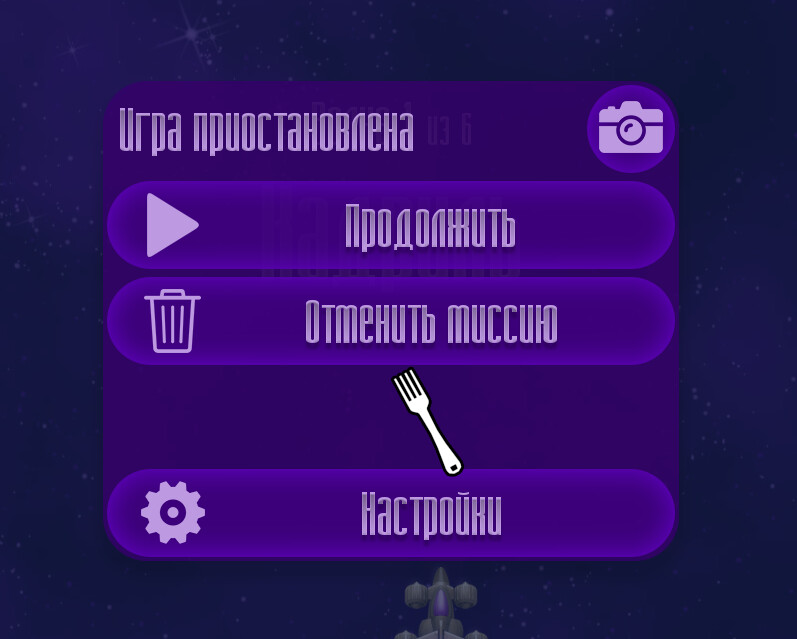
By the way, the pause menu might benefit from having bigger gaps between the content and the window border. The buttons are claustrophobic, especially the “Settings” at the bottom and “Hide UI” at the top.
1 Like
I have a YouTube channel called “Zoofy Zoof”.
I uploaded a video of my gameplay just now on the 3rd episode. I just have the frame limit set to 60, but there are a ton of jumps going to near double FPS or halving it down to 30 or worse. It’s okay in some areas, but very noticeable in others. At one point, I almost die because of it.
CIE2, like I mentioned before, has the worst performance of them all. Extremely inconsistent, constant stuttering persisting through all gameplay.
I apologize if I’m not allowed to mention my channel in addition to not being allowed to post links…
I have noticed the game is loading things at the start, the fork cursor goes from gray to white.
Yes, the game unfortunately continues to have an unstable framerate even after everything has loaded in. I don’t know why this is happening, so I’ve given up and decided to play exclusively on my steam deck instead. It runs perfectly fine on it, little to no issues.
However, although it’s rather rare to see on the deck, I have noticed the game stuttering at times. Not really sure what’s causing the performance issues, but the game is basically unplayable on my PC.
I did not have this problem even with CIU either. Before these updates, I have never ever had performance issues.
Alright, changed in v.20  Idea
Idea
Changed in v.20 Idea
You mean the purple tutorial text? Or all small text?
Changed in v.20
I’ve just watched this and it is indeed very inconsistent (even ignoring the loading phase at the start). Can you just double-check that:
- Your CPU isn’t doing other work (like installing updates, or having many browser windows open) while you play
- Your capture software itself is not the cause (i.e., that you’re still getting inconsistent framerate even if while you’re not capturing)
- The inconsistency persists even after a clean reboot.
This is even stranger, because all games literally run on the exact same engine.
You can freely post links to videos, provided that the video is related to the bug/issue (as it clearly is, in this case)
4 Likes
Are you saying that the default sound volume should not be 100%? What do other games typically default at?
4 Likes
Changed in v.20 Idea
5 Likes
can i ask you something
what is the spectification of your pc/laptop that using in that video?
i have my back then acer aspire 5 with i5 1035G1 (worse cpu i ever use) and a mx350 GPU (render-only so it might weak in some cases)
Now i use gaming laptop and it perform exactly as i running ciu and other episode.
Also would you check if other app or web browser you are using (also screen recorder) that might affect cpu ultilization.
(episode 4 ciu ver.) Nobody did report this yet but i just found out if you customize boss themes equipment before doing episode 4 and… it just plays ci4 boss theme instead the one you did customized during chapter 1 when encountering the astronaut chicken till superchick appears. (with the expection of later chapters which is they are really fine it plays the boss theme you did customized right away)
I use a gaming laptop.
I have 8 gigabytes of RAM, an i5-9300H intel core CPU @ 2.40GHz, 4 cores 8 logical processors, 4142 MB of graphics memory, and I have an Nvidia GTX 1650 graphics card.
I can confirm that me recording is not causing the lag. It never does, and I don’t normally record my gameplay either, I only did it that once just to show the bad framerate. The only other programs I have running are the same ones I’ve always had running before the updates, Steam and Discord.
Oh, and um… I tried to post a link, but the website told me I am not allowed to. It may be because my account is too recently made.
1 Like
Small purple text that’s the darkest on the image.
I often see something around 70-80%, but most of the games I played don’t have their music in the main menu as loud and fast paced (or in the tutorial, in case of the episodes). The music level is more or less alright in most cases, maybe the only exception is that one Christmas track that starts with “TAAAAAAAA, TA TADAAAAA”, but as soon as you kill the first few chickens which are almost twice as loud as the background music, the travel to the settings is guaranteed. I think the default SFX volume should be lowered from 100 to 70 or so.
I agree the SFX volume is too loud.
It overpowers the music when a much more average volume is around the same as the Music’s, 50%. I keep my SFX volume on like 52%.
Chicken Invaders Episode 4 isn’t downloading properly on Steam Deck.
I just tried to play it and I noticed it’s not showing up when I click to play the game. Many files are missing. For example, the .exe file for starting the game. I’ve verified the integrity of game files, uninstalled/reinstalled, and nothing is working.
Edit:
I have copied the files from my PC to my steam deck. It’s also not working. First the CIep4 folder, then the entire game folder. It will not recognize CIep4.
Then, I tried using Steam Launch Options to force it to run the .exe. It’s not working.
i see but i don’t know what other can cause that
this is my record on my old laptop (you see that the cpu only eats 10-12 watts)
it stutters but not affect much of the gameplay.
I JUST FOUND OUT WHAT MY PROBLEM WAS
I was running my PC in Battery Saver mode - which I do to reduce the amount of heat it generates.
I just set it to “Ultimate Performance” and the game is running perfectly fine.
I highly recommend everyone do this for the best performance! You have to use a CMD command to unlock Ultimate Performance though, so look up how to do that first.
Oh, and… Sorry for bothering about performance issues when it was… my fault… heheheh…
1 Like
This does not explain why CIU was not affected, though.
Changed in v.152/v.20 Idea
Episode 4 is Windows-only and Steam is getting confused because there is an old Linux depot for CI4 which I can’t remove entirely because players complain  . So it only shows native Linux depots.
There’s a workaround: Right-click on the game in your library → Properties → Compatibility → 
Force the use of a specific Steam Play compatibility tool and below select Proton 9.0-4
Let me know if this works for you, because undoubtedly it will affect many more players.
3 Likes