Tutorial: How to make a rainbow ghost trail:
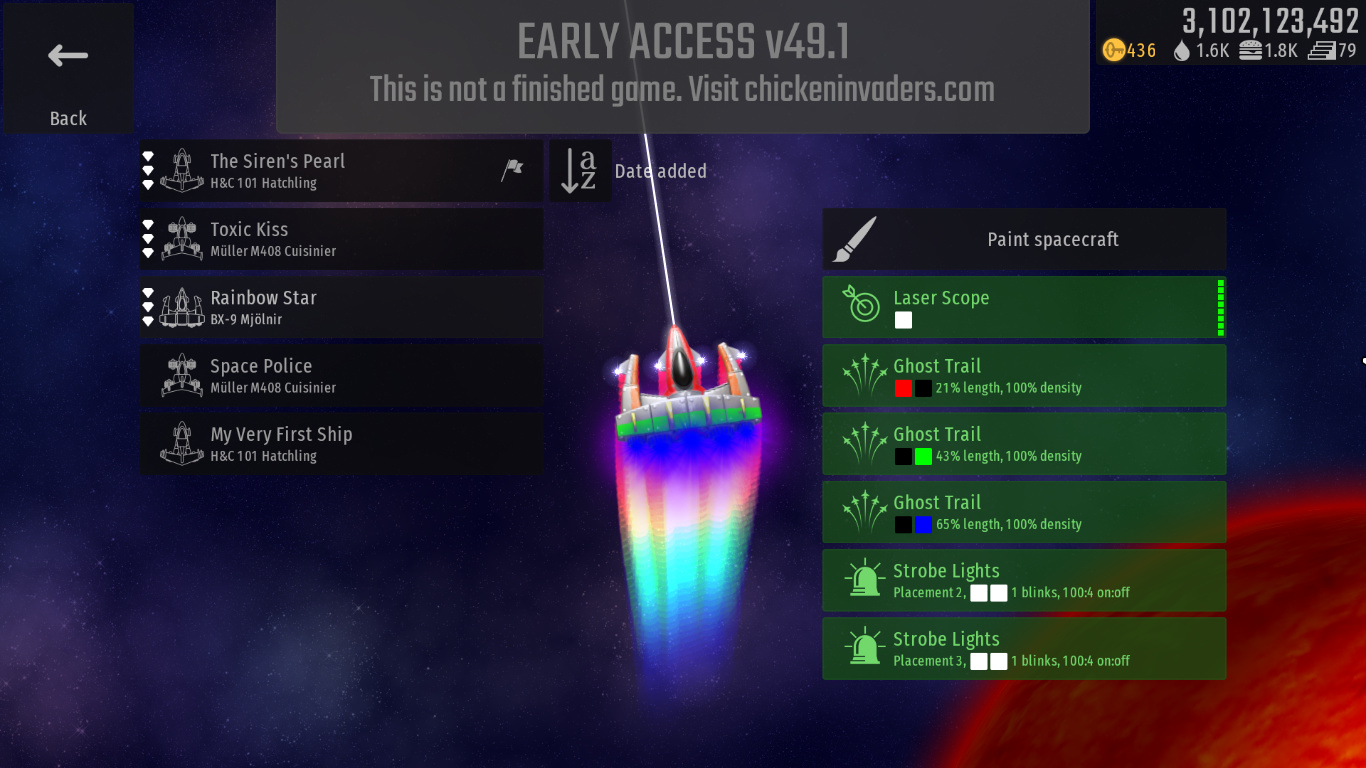
You will need:
- 3x Ghost Trails
- Enough keys to customize them
- A ship with at least three hardpoint slots
So first, go ahead and mount the three ghost trails on your spaceship.
You’ll want to make sure Additive Magic is enabled for each trail. The Density and Shrink/Expand setting are up to you (depending on what you want your finished rainbow trail to do) but to correctly achieve the effect they will all need to be at the same setting for each trail, otherwise it will be apparent that you haven’t used one, continuous trail.
First, for the colouration:
- Make the first trail have a root colour of red (as red as possible, 255,0,0) and a tail colour of black (0,0,0)
- Second trail needs a black root and a green (0,255,0) tail
- Final trail also has a black root, with blue (0,0,255) tail
Optionally, if you want to “flip” the direction of the rainbow around, you can make the trail with a red root have a blue one instead, and then make the blue tail trail red to match.
Next, you’ll want to change the trail lengths. Make the third trail (the blue one) any number divisible by three - then make the second trail two-thirds the length, and the last one one-third.
The final step is getting the opacity right. This might require some manual tweaking depending on the length of your trail, and your own preferences, but for my trail I used a similar technique to the thirds above. The root (the red trail) should be any number divisible by three, then the second trail should be two-thirds of that and the final trail one-third.
The result is a very cool and beautiful trail that will look amazing with many different paintjobs and cannot be mounted on any H&C spaceships in the game unless we get purchasable hardpoints…